Appartement condo·HÎte particulier
Family Seaside Retreat sleeps 6 walk to beach, restaurants, markets, activities.
Appartement condo avec des cuisines, Ă deux pas de Mission Bay Park
Galerie photos de lâhĂ©bergement Family Seaside Retreat sleeps 6 walk to beach, restaurants, markets, activities.


Avis voyageurs
10 sur 10
Exceptionnel
2 chambres2Â salles de bain6 personnes102.2Â mÂČ
Ăquipements populaires
Découvrir la zone

San Diego, CA
- Place, Mission Bay ParkâȘ1 min Ă piedâŹ
- Place, Mission and Pacific BeachesâȘ2 min Ă piedâŹ
- Place, Mission BayâȘ7 min Ă piedâŹ
- Airport, San Diego, Californie (SAN-AĂ©roport international de San Diego)âȘ12 min en voitureâŹ
Chambres et lits
2 chambres (6Â personnes)
Chambre 1
1 grand lit
Chambre 2
2 lits superposés (1 place)
2Â salles de bain
Salle de bain 1
Savon · Serviettes fournies · Baignoire ou douche · Toilettes · Douche uniquement · Shampoing · SÚche-cheveux
Salle de bain 2
Savon · Serviettes fournies · Baignoire ou douche · Toilettes · Douche uniquement · Shampoing · SÚche-cheveux
Espaces
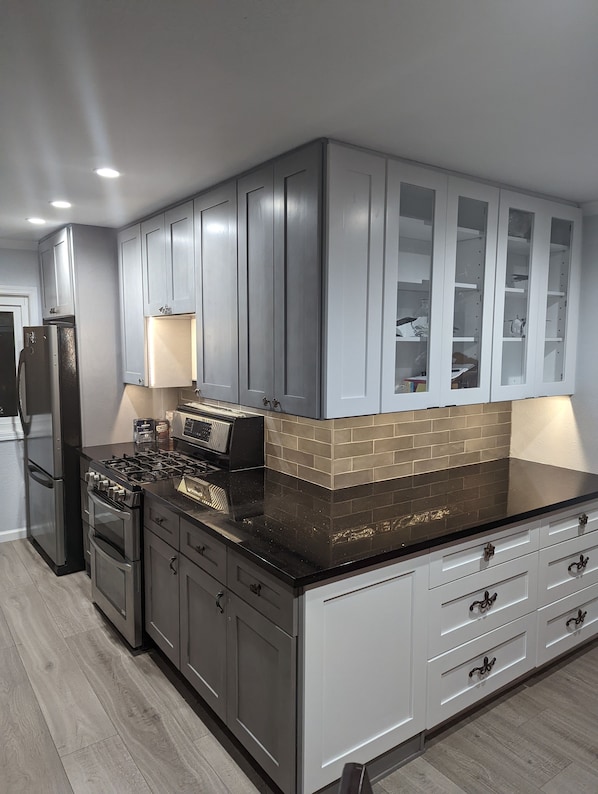
Cuisine
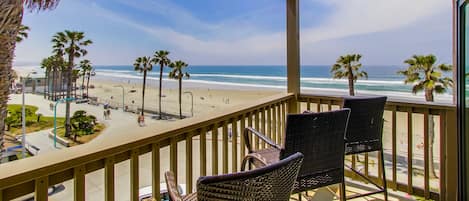
Balcon
Salle Ă manger
Protégez vos paiements : réservez toujours sur Abritel.
Nâacceptez jamais les demandes suspectes et utilisez toujours les moyens de rĂ©servation offerts sur notre site ou notre appli. Si une personne vous demande de rĂ©server ou de payer directement auprĂšs dâelle avant que vous effectuiez votre rĂ©servation sur Abritel, veuillez ne pas lui rĂ©pondre et nous le signaler.
à propos de cet hébergement
Family Seaside Retreat sleeps 6 walk to beach, restaurants, markets, activities.
Home orientation and operating instructions.
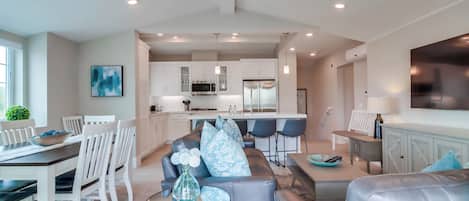
Living space.
The living space like control is located against the first entry wall to the area and a panel by the TV. All lights are dimmable.Â
The zebra light filter shades can be adjusted to allow more light or less light into the area. To adjust the blinds slightly push up in the center of the blind and they'll begin to toggle. Do not try to pick up the blinds from the end, blinds should only be lifted and pull from the center.
The living area.
Includes blackout curtains. Blackout currents can be used when watching the TV. The control for the blackout curtains are against the center wall near the hallway. Before closing the curtains, be sure to move furniture or items approximately 6 in from the wall to allow the curtains to close. On the curtain remote, the top button is to close the curtain, The middle button is to stop and the button is to open the curtains. Â
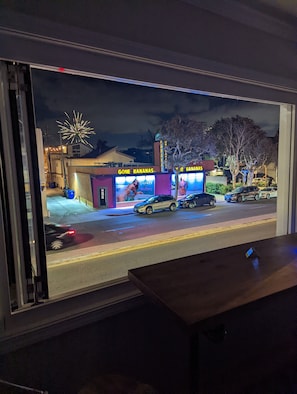
The kitchen roller blind (facing street) can be controlled using the remote located on the right side of the window. Do not attempt to pull the blind manually.
The TV can be turned on using the remote. These stereo is sync with the TV. Manual intervention is not required. PlayStation 2 is connected to the main TV. Games for PlayStation 2 can be found in the first white put out drawer in the living area. In this drawer. You will also find other table games.
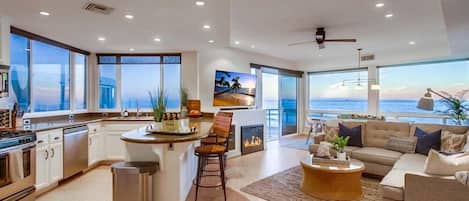
Kitchen
When cooking, please use the overhead air vent on the microwave. The two large windows in the kitchen area can be opened. Â
Kitchen Window
To open the window facing the Street, lift the window screen from from the bottom right corner. The screen is held on with Velcro. Once you left the screen of grab the handle, Pull and turn clockwise. Once window is released, gently push the window out. Replace the window screen on the right side. On the left side of the window, same thing pull the corner of the window screen, grab the window bar slightly. Pull and push it up. Once the window is released, push the window out. Be careful not to crush your fingers. Once done replace the window screen. Â
To close the window, lift the window screen on the left hand side and pull the window in. Holding the window handle, hold the window in and turn counterclockwise. You may have to give it a nudge. Once it is locked, secure them and the screen. On the right hand side, pull the window in firmly and turn the latch counterclockwise. The other window works on the same principal.
Trash bins are located in the ally (south side of building). City trash pickup is early Tuesday morning. Blue bins is for recycling. gray bins are for all of their trash elements. No hazardous materials or liquids.
Beach Gear
Beach gear is located behind the door on the first floor by the mailboxes.
Beach towels in the cabinet TV leading to the second bathroom.

Living space.
The living space like control is located against the first entry wall to the area and a panel by the TV. All lights are dimmable.Â
The zebra light filter shades can be adjusted to allow more light or less light into the area. To adjust the blinds slightly push up in the center of the blind and they'll begin to toggle. Do not try to pick up the blinds from the end, blinds should only be lifted and pull from the center.
The living area.
Includes blackout curtains. Blackout currents can be used when watching the TV. The control for the blackout curtains are against the center wall near the hallway. Before closing the curtains, be sure to move furniture or items approximately 6 in from the wall to allow the curtains to close. On the curtain remote, the top button is to close the curtain, The middle button is to stop and the button is to open the curtains. Â
The kitchen roller blind (facing street) can be controlled using the remote located on the right side of the window. Do not attempt to pull the blind manually.
The TV can be turned on using the remote. These stereo is sync with the TV. Manual intervention is not required. PlayStation 2 is connected to the main TV. Games for PlayStation 2 can be found in the first white put out drawer in the living area. In this drawer. You will also find other table games.
Kitchen
When cooking, please use the overhead air vent on the microwave. The two large windows in the kitchen area can be opened. Â
Kitchen Window
To open the window facing the Street, lift the window screen from from the bottom right corner. The screen is held on with Velcro. Once you left the screen of grab the handle, Pull and turn clockwise. Once window is released, gently push the window out. Replace the window screen on the right side. On the left side of the window, same thing pull the corner of the window screen, grab the window bar slightly. Pull and push it up. Once the window is released, push the window out. Be careful not to crush your fingers. Once done replace the window screen. Â
To close the window, lift the window screen on the left hand side and pull the window in. Holding the window handle, hold the window in and turn counterclockwise. You may have to give it a nudge. Once it is locked, secure them and the screen. On the right hand side, pull the window in firmly and turn the latch counterclockwise. The other window works on the same principal.
Trash bins are located in the ally (south side of building). City trash pickup is early Tuesday morning. Blue bins is for recycling. gray bins are for all of their trash elements. No hazardous materials or liquids.
Beach Gear
Beach gear is located behind the door on the first floor by the mailboxes.
Beach towels in the cabinet TV leading to the second bathroom.
Ajoutez des dates pour connaĂźtre les prix
Services et équipements
Cuisine
Lave-linge
SĂšche-linge
Wi-Fi haut débit gratuit
Vue sur la plage
Climatisation
Hébergements similaires

Beachy 2-bedroom, 2-bath Cottage in Mission Beach San Diego- 20 steps to Ocean
- Vue sur lâocĂ©an
- Cuisine
- Lave-linge
- SĂšche-linge
10.0 sur 10, Exceptionnel, (3Â avis)